August Wi-Fi Smart Lock (4th Gen) Review: Is This Retrofit Lock Worth It?
Most smart locks ask you to rip out your deadbolt and start over. The August Wi-Fi Smart Lock (4th Gen) takes the opposite approach: it bolts onto the inside of your door, keeps your existing keys working, and adds remote control through your phone. This guide is for anyone weighing that trade-off — retrofit convenience against the keypad-and-full-replacement style of locks like the Schlage Encode Plus or Yale Assure Lock 2.
Quick Answer
Related reading: A smart lock is half of a smart entryway — see our Ring Battery Doorbell review for the video side of the setup. Voice control ties it together; our Echo Dot (5th Gen) review covers the hub most people pair with this lock.
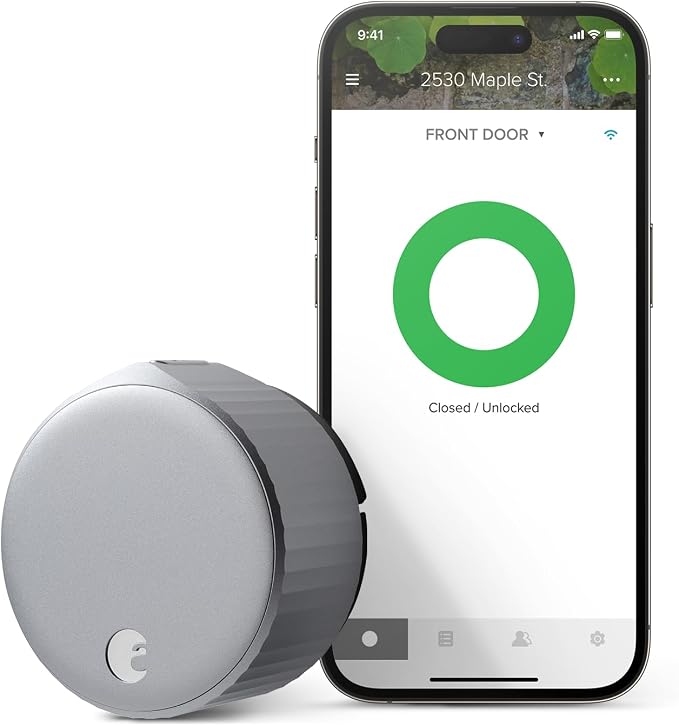
The August Wi-Fi Smart Lock (4th Gen) is the pick for people who want smart features without replacing their deadbolt: built-in Wi-Fi, no extra hub, and your old keys keep working. The catch? No keypad on the door — entry is by phone, voice assistant, or August’s separate keypad accessory.
Compare Top Smart Locks for Your Front Door
Three proven picks side by side — choose the one that fits your door.
August Wi-Fi Smart Lock (4th Gen)
Retrofit design · built-in Wi-Fi · keeps your keys
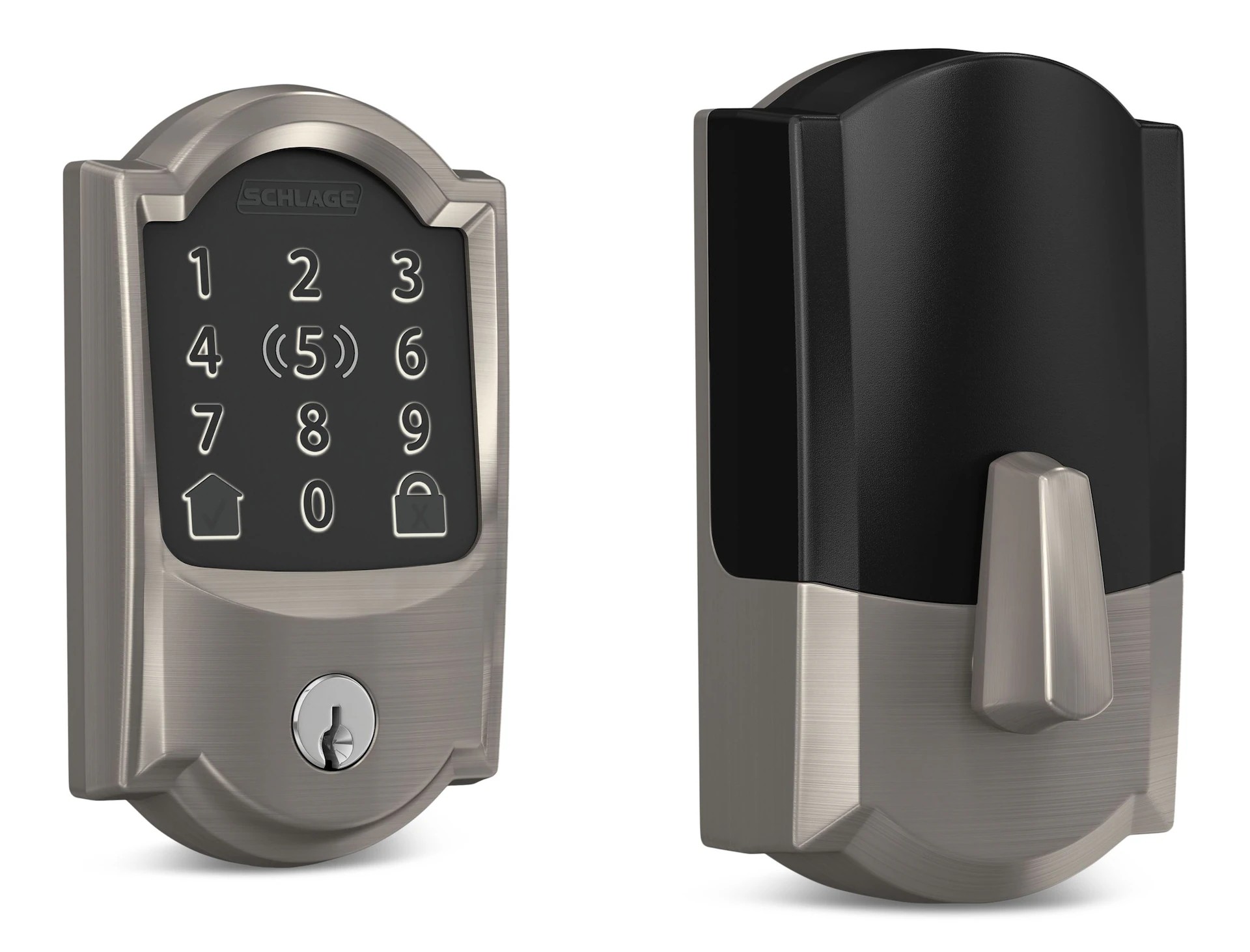
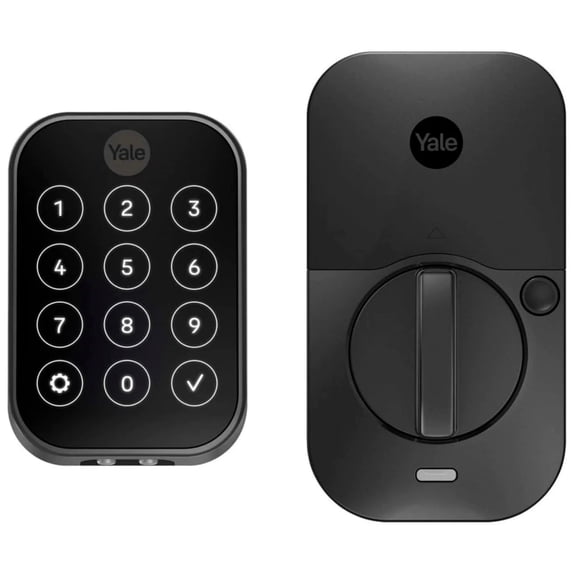
Prices and availability may vary — tap any product to check the current listing.
What to Look For When Buying a Smart Lock
Smart locks all promise the same dream: never fumble for keys again. A few decisions matter far more than the spec sheet suggests.
Retrofit vs. full replacement: the first fork in the road
This one decision eliminates two-thirds of the market. A retrofit lock like the August attaches inside your existing deadbolt — the exterior doesn’t change at all: same handle, same key cylinder, same look from the street.
That matters for renters, HOA neighborhoods with strict appearance rules, and anyone with a pricey door set. Full-replacement locks swap the whole deadbolt — integrated keypad and unified look, but also rekeying and a small construction project. Retrofit is the low-drama option.
Built-in Wi-Fi vs. hub-and-bridge setups
Older smart locks needed a separate Wi-Fi bridge for remote control — one more gadget, one more thing to troubleshoot. The 4th-gen August has Wi-Fi built in, so remote control, guest access, and activity history work out of the box. Both competitors offer built-in Wi-Fi versions too — just double-check the exact model, since both brands also sell non-Wi-Fi variants.
Keypad or no keypad: how will people actually get in?
Here’s the August’s most honest trade-off: no keypad on the door. You get in with the app, auto-unlock, a voice assistant, or your old key. Fine for the phone-in-hand crowd; less fine for kids, dog walkers, the in-laws.
Schlage and Yale put the keypad front and center: punch a code, walk in. August sells a separate keypad accessory to close the gap, but it’s an extra purchase and another device on your door frame. Be honest about your household before you choose.
Auto-lock and auto-unlock: convenience with a learning curve
Auto-unlock as you approach feels like magic the first week — the lock senses your phone and turns the bolt before you reach the handle, and August’s door-sensing tech confirms the door is actually closed. But geofencing is finicky; it depends on your phone’s location services, and phones aren’t perfect at that. Expect a short tuning period, not instant perfection.
Battery life: the hidden maintenance tax
Wi-Fi is thirstier than Bluetooth — that’s physics, not a brand problem. A Wi-Fi lock needs fresh batteries noticeably sooner, and the app warns you well before they die. Treat it like smoke detector batteries: swap them the weekend the warning appears. And keep a physical key accessible — dead batteries plus no keypad equals a very expensive thumbturn.
Ecosystem fit: your voice assistant matters
All three work with the major voice assistants, but details differ: Schlage’s Encode Plus goes furthest for iPhone households with tap-to-open from iPhone or Apple Watch. Pick based on the ecosystem you actually live in — if your home runs on HomeKit, Schlage’s tap entry is a genuine daily delight.
How to Match the Smart Lock to Your Situation
The renter (or the “don’t touch my door” owner)
You can’t — or won’t — change the exterior hardware. The August was practically designed for you: interior-only installation, exterior untouched, original keys still work. When you move, it comes off in minutes.
The Apple household
Everyone has an iPhone, the house runs on HomeKit. The Schlage Encode Plus earns its keep here with phone-as-key tap entry; the August works fine too, but won’t give you that tap-the-watch moment. Decide what that daily interaction is worth.
The host and the busy family
You hand out access regularly — a cleaner on Tuesdays, the in-laws for the weekend. Keypad locks shine here: create and revoke codes in seconds, no app needed for the guest. The August handles guests through the app — great for tech-comfortable visitors, less so for grandma.
How the Tiers Compare
Here’s where each pick sits — and what you’d trade by moving between them.
| Type / Tier | Best For | Price Tier | Key Feature | Watch Out |
|---|---|---|---|---|
| Retrofit Wi-Fi locks (August’s tier) | Renters, existing deadbolts | Mid-range | Interior-only install, keeps keys | No built-in keypad |
| Keypad deadbolts (Schlage’s tier) | Families, guest codes | Mid-range to premium | Touchscreen codes + physical key backup | Full deadbolt replacement required |
| Slim key-free locks (Yale’s tier) | Modern doors, minimal look | Mid-range | Compact touchscreen, key-free option | Key-free means no physical backup on some models |
| Budget Bluetooth locks | Single users, basic needs | Budget-friendly | Cheap entry to keyless life | No remote access without a hub |
Retrofit Wi-Fi locks win on installation ease — but they concede the keypad, so your phone becomes the key.
Keypad deadbolts are the family workhorses: codes for everyone, a real key as backup, and the most forgiving experience for non-technical household members.
Slim key-free locks strike a design-forward middle ground — clean exterior, touchscreen entry — though going fully key-free means trusting electronics completely.
Budget Bluetooth locks look tempting, but losing remote access is the compromise that stings most in daily use.
Questions People Ask Before Buying
Straight answers to the questions shoppers actually ask
Should I buy a smart lock, or stick with a regular deadbolt?
Buy the smart lock if key hassles are a recurring headache — lost keys, locked-out kids, coordinating cleaners or guests — because remote control and temporary access solve problems a regular deadbolt can’t. Stick with the regular deadbolt if your setup never causes trouble and nobody wants another app to maintain.
A regular deadbolt is beautifully simple: it works in a power outage and never needs updates. The smart lock’s case rests on access management — checking “did I lock the door?” from your desk, or giving the plumber a code that expires at 5pm.
Is the August Wi-Fi Smart Lock worth it compared to cheaper smart locks?
Yes, if you value the retrofit design and built-in Wi-Fi. Cheaper locks usually cut one of two corners: a separate Wi-Fi bridge for remote access (another gadget, another failure point), or full deadbolt replacement (a non-starter for renters). The August installs in minutes with no exterior changes and works remotely out of the box.
Where it doesn’t justify itself: if you need a keypad on the door, budget locks with integrated keypads serve you better for less.
August vs Schlage Encode Plus — which one should I buy?
Choose the August if keeping your existing deadbolt and keys matters — renters, HOA-restricted exteriors, or anyone who likes their current hardware — since it installs inside in minutes. Choose the Schlage Encode Plus for a keypad on the door, tap entry with iPhone or Apple Watch, and physical key backup in one integrated unit.
Walk outside and look at your deadbolt. If replacing it makes you sigh — rekeying, matching finishes, landlord permission — the August removes all that friction.
Does the August smart lock still work if my Wi-Fi goes down?
Yes. The app connects over Bluetooth when you’re near the door, and your physical key always works since the original cylinder is untouched — a Wi-Fi outage costs you remote access from afar, not entry itself. Expect geofence auto-unlock to pause until the network returns.
Internalize this before buying any smart lock: remote features need the internet, but basic entry shouldn’t. Keep a key somewhere sensible and a dead router is an inconvenience, not a lockout.
Will the August lock fit my existing deadbolt?
It fits most standard single-cylinder deadbolts — thumbturn inside, key outside — because it replaces only the interior assembly and reuses your bolt and strike plate. It won’t fit integrated handle-and-deadbolt combos, mortise locks, or rim cylinders, so confirm your deadbolt type before ordering.
Quick test: stand inside and look. A separate thumbturn above a separate handle means you’re almost certainly compatible.
Renting? This Is Your Lock
Most landlords forbid changing exterior locks. The August sidesteps the argument: nothing visible changes, the landlord’s key still works, and you get auto-lock plus remote monitoring. When you move, it comes off in minutes.
Renter security angle: how many copies of your key exist from previous tenants? With the August, you see every lock event and revoke access instantly.
Common Mistakes Buyers Make
1. Buying for the app screenshots, not the door
The prettiest app doesn’t matter if the lock doesn’t fit your door or your household’s habits. Start with the door and the people, then pick. App polish is a tiebreaker, not a strategy.
2. Forgetting about the keypad gap
The number-one August regret: buyer loves the retrofit idea, then realizes the dog walker needs a code, not an app invite. If anyone needs regular entry without a smartphone, budget for the keypad accessory or choose a keypad-native lock.
3. Ignoring low-battery warnings
The app will tell you — clearly, repeatedly — when batteries run low. A smart lock with dead batteries and no keypad becomes a very calm, very locked door. Swap batteries the weekend you get the warning, and keep a physical key somewhere reachable.
4. Skipping the door alignment check
Smart locks have motors; motors hate friction. If your deadbolt needs a hip-check to throw fully, the motor strains and drains batteries faster. Close the door and throw the bolt by hand — it should glide. If not, adjust the strike plate first.
Why, How, What: Quick Answers
Why do some smart locks need a hub while others don’t?
Wi-Fi radios are power-hungry, so older designs used low-energy Bluetooth in the lock and offloaded Wi-Fi to a plugged-in bridge. Newer locks pack efficient enough Wi-Fi to connect directly. The hub era was a workaround for battery physics; better radios made it obsolete.
How do you give someone temporary access?
On keypad locks, create a code in the app, set when it works, and text it to your guest — no app needed on their end. On the August, send an app invite with scheduled access: equally flexible, but the guest installs the app. Weekend visitor? The code is less friction.
What happens during a power or internet outage?
The lock runs on batteries, not wall power, so a blackout changes nothing. No internet means no remote control or geofence auto-unlock — but Bluetooth entry nearby and the physical key still work.
Frequently Asked Questions
Can I still use my regular key with the August smart lock?
Yes — that’s the point of the retrofit design. The August replaces only the interior thumbturn; your key cylinder, bolt, and strike plate stay as they were. Old keys work from outside like always.
How hard is installation, really?
August: remove two screws, take off the interior thumbturn, mount the August over the tailpiece — about ten minutes with a screwdriver. Schlage or Yale: you’re replacing the full deadbolt, more like 20–30 minutes.
Is a smart lock as secure as a regular deadbolt?
Physically, comparable — you’re still relying on a metal bolt in a strike plate, and the August reuses your existing one. The new attack surface is digital: app accounts, Wi-Fi, Bluetooth. Use a strong unique password, enable two-factor authentication on the lock’s app account, and keep the app updated.
Do I need the August keypad accessory?
Only if someone needs regular entry without a smartphone — kids, cleaners, dog walkers. If everyone carries a phone, skip it. But be honest: the keypad is cheap insurance against the “locked out with a dying phone” scenario.
August vs Yale Assure Lock 2 — which is better for a modern front door?
The Yale wins on looks — slim touchscreen, cleanest exterior of the three. The August wins on flexibility — no exterior change, keeps your keys, easiest install.
Will guests need to download an app?
With the August, yes for app-based guest access — though a physical key or keypad code needs nothing. With the Schlage or Yale, no — just text a keypad code. That difference matters most for rental hosts.
Final Recommendation
So, is the August Wi-Fi Smart Lock (4th Gen) worth it? If you’re renting, like your current door hardware, or want a 10-minute install with zero exterior changes — yes. Built-in Wi-Fi, your keys keep working, and the door looks identical from the street.
Choose the Schlage Encode Plus if a keypad is non-negotiable or your household runs on iPhones. Choose the Yale Assure Lock 2 for the sleek, key-free, modern look. All three are proven — the right one matches your door and your people.
OUR TOP PICK
August Wi-Fi Smart Lock (4th Gen)
Retrofit design · built-in Wi-Fi · keeps your keys
Decision Tree: Should You Buy It?
→ Renting, or can’t change exterior hardware? Yes → the August is the obvious answer.
→ Need a keypad on the door for family or guests? Yes → look at the Schlage or Yale instead.
→ Everyone carries an iPhone and wants tap entry? Yes → the Schlage Encode Plus earns its premium.
→ Want smart features with a 10-minute install and your keys still working? Yes → buy the August.
Key Takeaways
• The August’s superpower is retrofit: interior-only install, existing deadbolt and keys untouched, nothing changes on the outside of your door.
• Built-in Wi-Fi, no extra hub — but no keypad, so your phone (or the keypad accessory) is how people get in.
• Match the lock to the door and the household: renters and key-keepers go August, code-sharers go Schlage or Yale.