
Anker USB C Hub, 5-in-1 USBC to HDMI Splitter: Is This Versatile Adapter Worth Your Cash?
Alright, let’s talk about the Anker USB C Hub, 5-in-1 USBC to HDMI Splitter. If you’re tired of juggling dongles or find your modern laptop lacking those essential ports, you’ve probably eyed one of these. This guide cuts through the marketing fluff, giving you a real-world look at whether this particular Anker USB-C hub makes sense for your setup and how it stacks up against other options. We’re here to figure out if it’s a smart buy for your hard-earned money.
Quick Answer
For most laptop users needing to expand connectivity with a single external monitor, a couple of USB-A devices, and a power pass-through, the Anker USB C Hub, 5-in-1 is a seriously solid contender. Its balance of crucial ports, reliable power delivery, and decent data speeds makes it a compelling, mid-range choice that often hits the sweet spot between basic adapters and full-blown docking stations. It’s a “worth it” for many.
What to Look For (The Buying Criteria)
Navigating the world of USB-C hubs can feel a bit like wading through alphabet soup. Seriously, what do all those numbers and letters mean for you? When you’re considering a 5-in-1 hub like the Anker model, here’s what actually matters.
Port Selection & Necessity
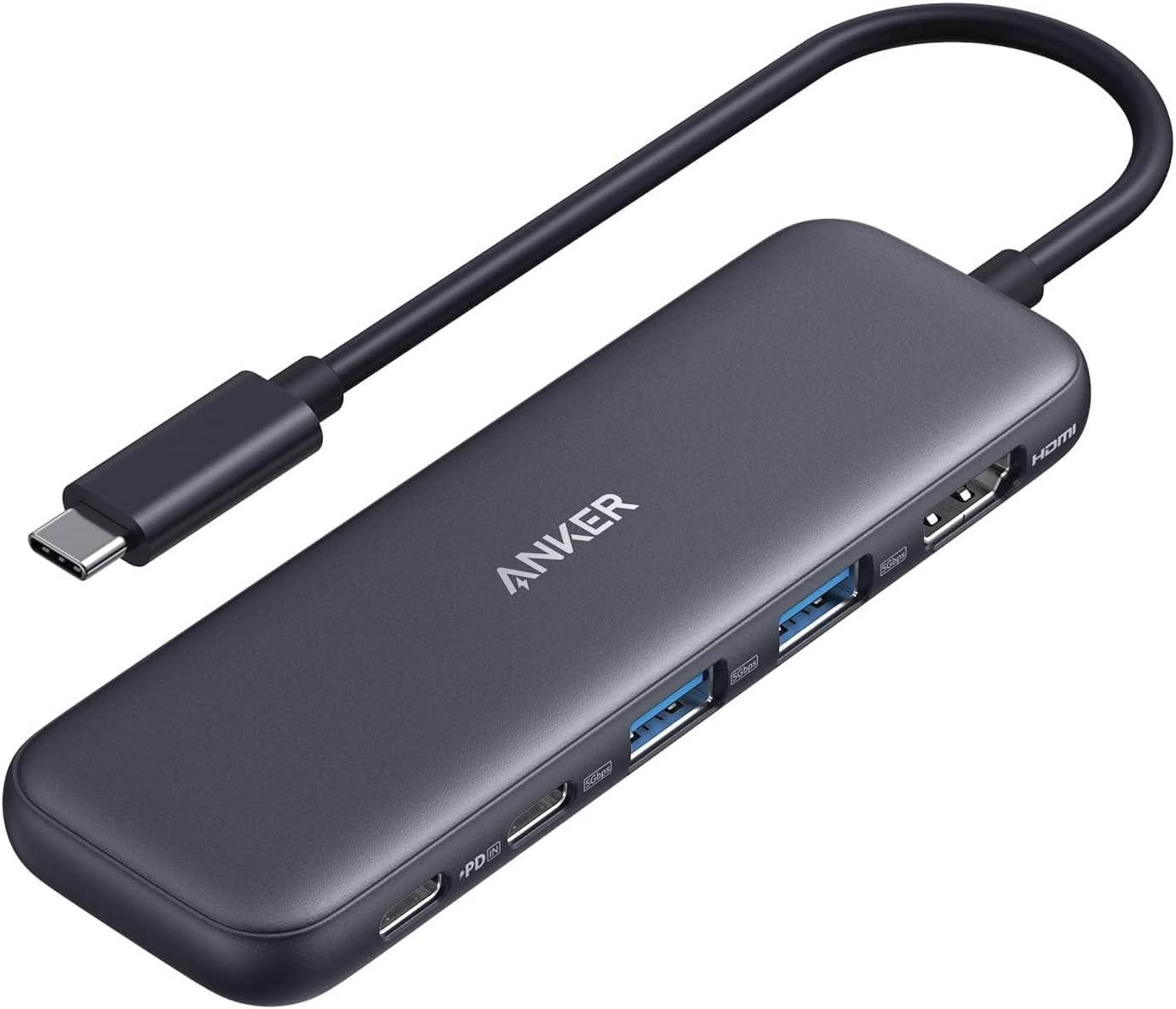
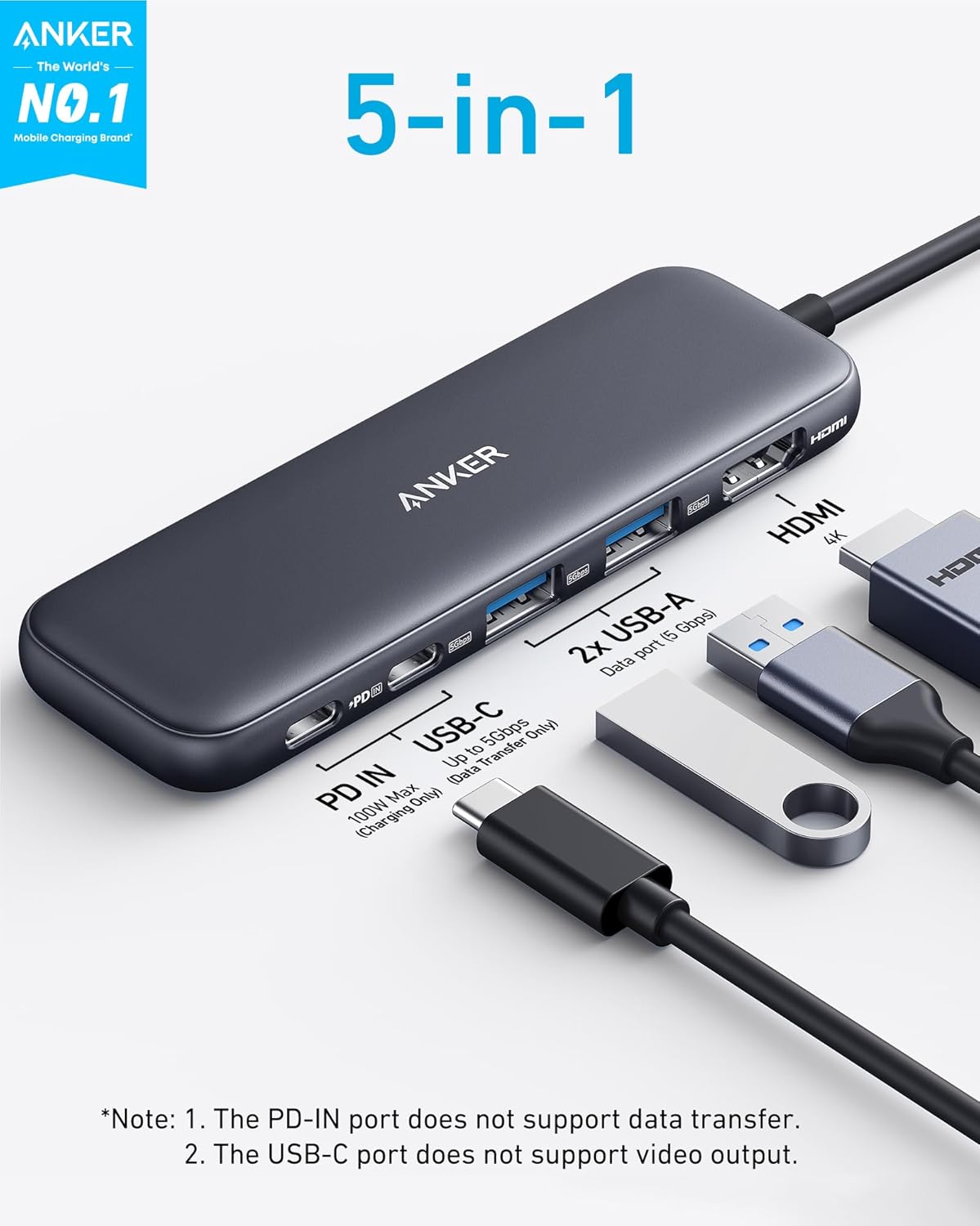
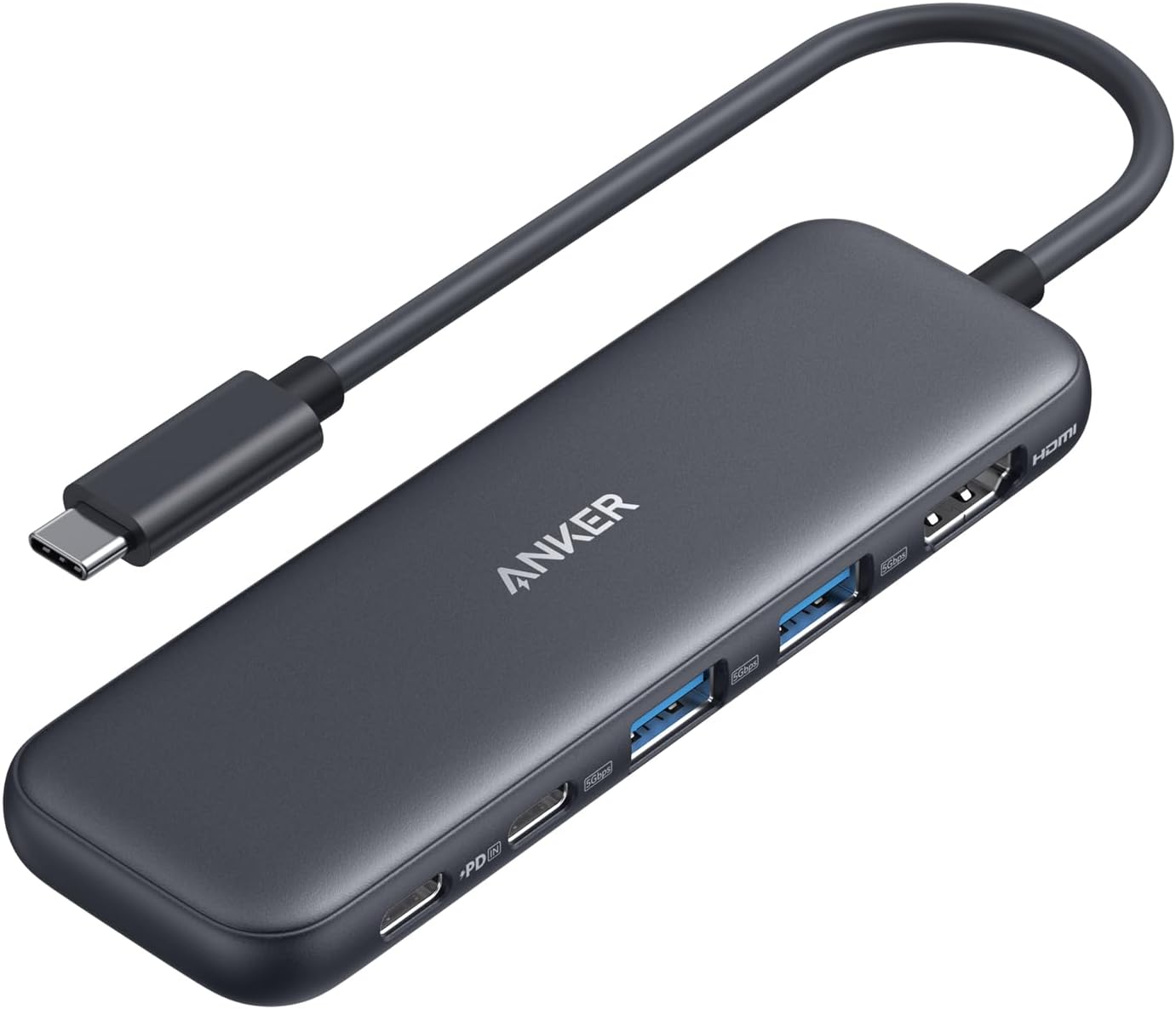
First things first, what ports do you actually need? The Anker 5-in-1 hub offers a very specific set: an HDMI output, a powered USB-C 5Gbps data port, two powered USB-A 3.0 5Gbps data ports, and, crucially, a USB-C Power Delivery (PD) input. That’s it. It’s not a sprawling port array, but a focused one. Need an Ethernet port? An SD card slot? Another display output? This hub doesn’t have ’em. Its strength lies in its simplicity and the utility of the chosen ports. Don’t pay for what you don’t use, but also don’t buy something that misses a critical need.
Power Delivery (PD) Capabilities
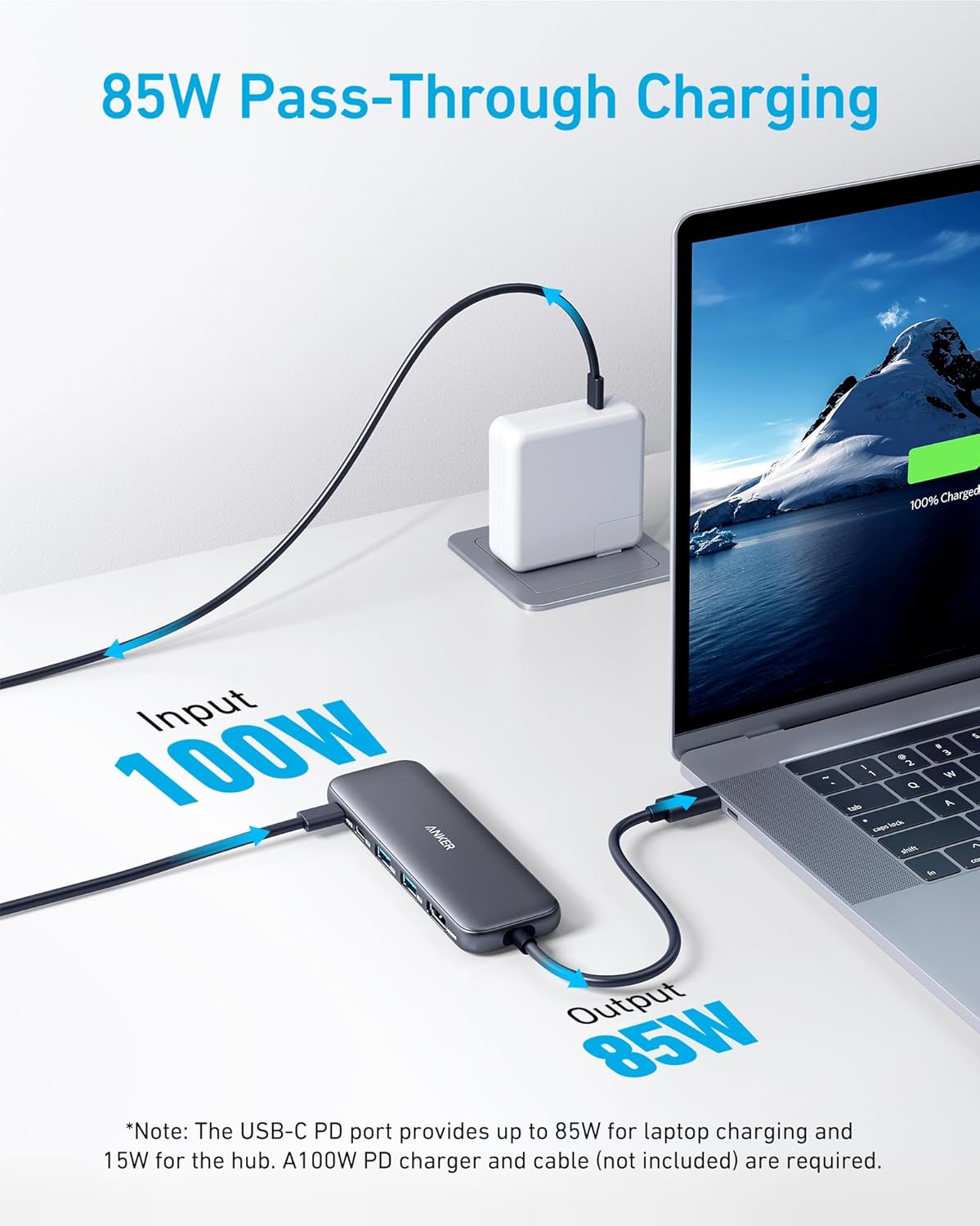
This is where many cheaper hubs fall flat, and frankly, it’s a mistake people make all the time. The Anker USB C Hub boasts an 85W Max PD pass-through. What does that mean? It means you can plug your laptop’s USB-C charger into the hub, and the hub will pass up to 85 watts of power through to your laptop, while still powering its own functions and any connected peripherals. For power-hungry machines like many MacBook Pro models or Dell laptops, 85W is often enough to charge efficiently, even under load. If you’re connecting a high-performance laptop, anything less than 60W could leave you slowly draining your battery, even when plugged in. This is a non-negotiable feature for serious users.
Video Output Quality
The “4K Display” promise on this Anker USB-C hub sounds simple, right? But the devil’s in the details. It supports 4K at 30Hz, which is perfectly fine for presentations, watching movies, or general productivity. You’re not going to notice much lag or choppiness unless you’re doing something super demanding like fast-paced gaming or professional video editing where a higher refresh rate (like 60Hz) becomes critical. For most folks just extending their desktop or mirroring a screen, 4K@30Hz is a solid, stable experience. Just be aware of the refresh rate limitation if you’re a serious gamer or editor.
Data Transfer Speeds
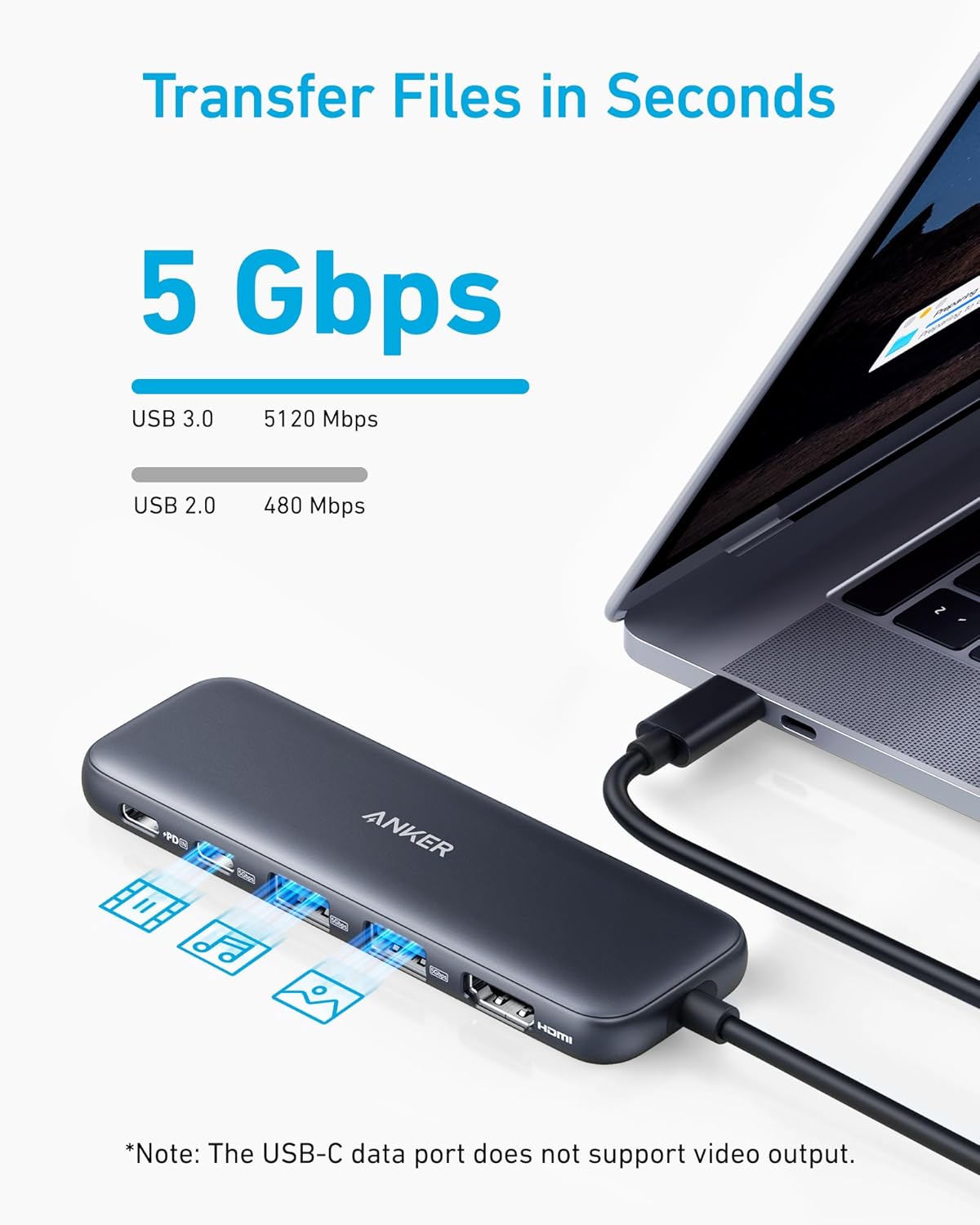
All the data ports on this particular Anker hub—the USB-C and the two USB-A ports—are rated for 5Gbps. That’s USB 3.0 speed, which is plenty fast for external hard drives, SSDs, flash drives, and peripherals like keyboards and mice. You can move large files pretty quickly. It’s not the absolute fastest standard out there (newer hubs can hit 10Gbps or even 20Gbps), but frankly, most people’s external devices don’t even support those faster speeds. So, for the everyday user, 5Gbps is a sweet spot, balancing performance with affordability. You aren’t likely to feel bottlenecked here unless you’re regularly transferring multi-terabyte files from an extremely fast NVMe external drive.
Build Quality & Portability
Anker generally has a reputation for decent build quality. This hub comes in black, and typically their products feel robust without being overly heavy. You want something that can withstand being tossed into a laptop bag and isn’t going to fall apart after a few months. A good hub, like this Anker, should feel solid, its ports firm, and its cable durable. It shouldn’t get excessively hot either, though some warmth is normal with power pass-through. Portability is key; a 5-in-1 design is meant to be small enough to travel, yet powerful enough to handle your daily needs.
Compatibility
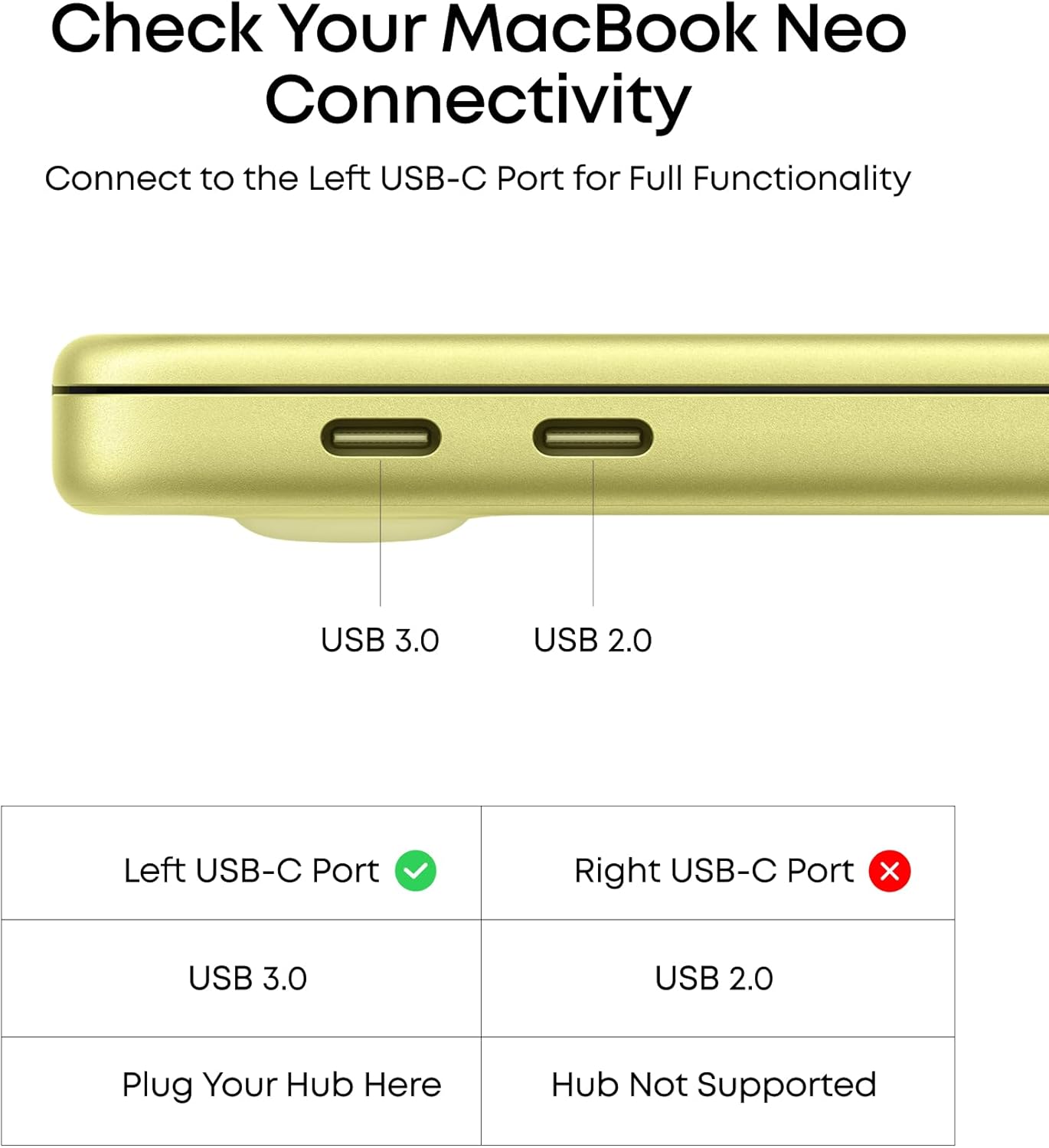
This hub specifically mentions compatibility with MacBook Pro, MacBook Air, and Dell laptops, among others. The beauty of USB-C and Thunderbolt (which uses the USB-C connector) is its increasing universality. If your laptop has a full-featured USB-C port that supports video output (DisplayPort Alternate Mode) and Power Delivery, chances are this hub will work. But it’s not always a given for every device. Some older laptops, or very basic Chromebooks, might have a USB-C port that only handles data, not video or power. Always double-check your device’s USB-C port capabilities. It’s a common oversight, actually.
How to Match the Product to Your Situation
Choosing the right hub is less about finding the “best” one and more about finding the best one for you. Think about your typical day.
The Mobile Professional
You’re constantly on the move, jumping between conference rooms, co-working spaces, and perhaps a coffee shop or two. Your bag is already heavy. You need a compact, reliable hub that can quickly connect to a projector (hello, HDMI!) or an external monitor, plug in a flash drive, and perhaps keep your MacBook Pro or Dell XPS charged without a separate power brick for the hub. The Anker 5-in-1 is practically built for this. Its dedicated HDMI, USB-A ports for peripherals, and solid 85W PD pass-through are ideal. You need something you can just grab and go.
The Home Office Power User
You’ve got a more permanent setup at home but still value flexibility. Maybe you want to hook up a 4K monitor, keep your laptop charging, and connect a couple of external drives or a wired keyboard/mouse. You don’t need a full-blown, desk-hogging docking station, but you do need more than just a single dongle. This Anker USB C Hub fits right in, letting you expand your laptop’s capabilities without too much clutter. It’s perfect for those who frequently disconnect their laptop to take it elsewhere but want a seamless re-connection experience when they return to their primary workspace. It’s a sweet spot.
The Occasional Connector
Let’s be real, some folks only need to plug in an external drive once a week, or connect to a projector maybe twice a month. You don’t need all the bells and whistles, and certainly don’t want to spend premium money. For you, the Anker 5-in-1 is probably a touch overkill if you rarely use the HDMI or need the high 85W PD. A simpler, more budget-friendly adapter might do the trick. Still, having the robust power delivery and 4K capability tucked away isn’t a bad thing. It’s a “buy once, cry once” scenario, offering future-proofing even if you’re not using every feature right now.
A Comparison of USB-C Hub Tiers
Let’s break down where the Anker 5-in-1 sits in the broader landscape of USB-C connectivity solutions. Different tiers serve different purposes, after all.
| Type/Tier | Best For | Price Tier | Key Feature | Watch-Out |
|---|---|---|---|---|
| Basic Dongle Adapter | Minimalist, single-purpose expansion | Budget-friendly | Converts one port (e.g., USB-C to HDMI) | Very limited functionality; often lacks PD pass-through. |
| Mid-Range 5-in-1 Hub | Versatile everyday use, moderate expansion | Mid-range | Balanced port selection, good PD (like 85W) | May lack niche ports (Ethernet, card readers) or dual displays. |
| Advanced Multi-Port Dock | Desktop replacement, heavy-duty connectivity | Premium | Extensive ports, high power, often dual displays | Larger footprint; can be overkill and expensive for casual use. |
A Basic Dongle Adapter usually means you get one, maybe two, extra ports. Think a simple USB-C to HDMI adapter. It’s cheap, but it’ll often hog your only USB-C port for video and leave your laptop without power unless you’ve got another port free.
The Mid-Range 5-in-1 Hub, exemplified by our Anker subject, offers a significant step up. You get that crucial HDMI, data ports for your drives and accessories, and importantly, Power Delivery pass-through, so you’re not sacrificing charging ability for connectivity. This is usually the sweet spot for folks seeking a good balance.
Then there’s the Advanced Multi-Port Dock. These are the big guns. We’re talking 10+ ports, sometimes dual 4K monitor support, Ethernet, multiple fast USB ports, card readers, and sometimes even a hefty power supply built-in. They’re fantastic for turning a laptop into a true desktop workstation, but they’re bulky and definitely a premium investment.
Real-World Scenarios for Your Anker Hub
Thinking about specific moments helps cement whether this particular Anker USB C Hub is really going to pull its weight for you.
On-the-Go Presentations
Imagine you’re walking into a meeting. You’ve got your sleek laptop, but the projector only has an HDMI port. And of course, you need to plug in a USB stick with your presentation files. Oh, and your battery is running low. With the Anker 5-in-1, it’s a simple plug-and-play. HDMI for the projector, a USB-A port for your flash drive, and your laptop’s charger into the hub’s PD port. You’re set. No scrambling, no multiple dongles. It just works.
Expanding Your Laptop’s Home Setup
Let’s say you’re back home. You want to use that nice 4K monitor you have, but your laptop only has USB-C ports. You also have a wired keyboard and mouse you prefer, and perhaps an external backup drive. Instead of a messy cable situation, this Anker hub becomes your single connection point. One USB-C cable from your laptop to the hub, and suddenly you have your 4K display, your keyboard, mouse, and external drive all connected, plus your laptop is charging through the hub. It cleans things up considerably.
Quick Data Transfers
Maybe you’re a photographer or videographer, or just someone who deals with big files. You finish a shoot, and you’ve got a USB 3.0 external SSD full of RAW images. Your laptop’s built-in ports are all taken, or maybe it just has slower USB 2.0. Plugging that fast external drive into one of the Anker hub’s 5Gbps USB-A 3.0 ports means you’re transferring those hefty files significantly faster than you would with older USB 2.0 ports. Speed matters when you’re moving gigabytes of data.
Common Mistakes When Buying a USB-C Hub
Believe me, I’ve seen people get totally bamboozled by port counts, only to find half of them are useless for their actual workflow. Don’t be that person.
- Ignoring Power Delivery Needs: This is probably the biggest blunder. Many budget hubs offer PD, but it’s often too low (think 45W or less) to actually keep a performance laptop charged under load. Your laptop might even tell you it’s charging slowly. Always check the PD wattage. If you’ve got a beefy machine, the Anker’s 85W is a minimum you should consider. Anything less and you’ll be frustrated.
- Overlooking Port Specifics: Not all USB-C ports are created equal. Some hubs have a USB-C port that’s only for power input. Others have one that’s only for data. The Anker 5-in-1 is pretty clear: one USB-C for data (5Gbps), one USB-C for power input (PD). Don’t assume every USB-C port on a hub can do everything; check the icons or description. It makes a real difference.
- Assuming Universal Compatibility: While USB-C is becoming standardized, not every device implements it fully. Your laptop’s USB-C port needs to support DisplayPort Alternate Mode for video output and Power Delivery for charging via the hub. If it doesn’t, a hub like this one won’t magically make it so. Double-check your laptop’s specs, especially for older or cheaper models.
- Prioritizing Price Over Quality: There’s a reason some hubs are dirt cheap. They often skimp on internal components, leading to unstable connections, overheating, or failure. A good hub is an investment in reliability. Anker’s reputation for decent quality means you’re generally getting a solid, dependable product. Penny-pinching too much here can lead to constant headaches.
Why, How, and What About USB-C Hubs?
Just some quick thoughts on the fundamentals.
Why bother with an external hub?
Modern laptops, especially the thin and light ones like the MacBook Air or certain Dell models, have sacrificed traditional ports for sleekness. An external USB C Hub bridges that gap, giving you back essential connections like HDMI for external displays or USB-A for your legacy peripherals. It’s about regaining versatility without adding bulk to your laptop itself.
How does Power Delivery work?
Power Delivery (PD) is a specification that allows for higher power transfer over a USB-C connection, both ways. When a hub like the Anker 5-in-1 supports PD, it means it can accept power from your laptop’s charger and pass that power through to your laptop, while simultaneously operating its own ports. It’s a smart system that dynamically negotiates the power level, making sure your devices get what they need.
What’s the difference between a hub and a dock?
Generally, a USB-C hub is a simpler, more portable device that expands a few key ports. It’s often bus-powered or relies on pass-through power, like the Anker 5-in-1. A docking station, by contrast, is usually larger, has its own dedicated power supply, offers a wider array of ports (including Ethernet, multiple video outputs, sometimes audio jacks), and is designed for a more permanent desktop setup, effectively turning your laptop into a full workstation.
FAQ
Is the Anker 5-in-1 USBC hub compatible with all USB-C laptops?
It’s largely compatible with most modern laptops that have a full-featured USB-C port supporting video output and power delivery. Check your laptop’s specific USB-C capabilities.
Can I use this hub with more than one monitor?
No, this Anker hub is an HDMI splitter, meaning it provides a single HDMI output for one external display. If you need two or more monitors, you’ll need a different type of hub or a dedicated docking station.
Will the 85W Power Delivery charge my laptop quickly?
For many laptops, including various MacBook Pro and Dell models, 85W PD is usually sufficient for efficient charging, even under typical workloads. However, extremely power-hungry devices might still charge slower than with their native, higher-wattage charger.
Does this hub require any drivers or software?
Nope, generally not. USB-C hubs like this Anker 5-in-1 are designed to be plug-and-play with modern operating systems. Your system should automatically detect and use the connected devices.
Can I connect external hard drives to the 5Gbps USB-A ports?
Absolutely! The 5Gbps speed is perfectly adequate for most external hard drives and solid-state drives, allowing for reasonably quick file transfers.
Final Recommendation
So, where does that leave us with the Anker USB C Hub, 5-in-1 USBC to HDMI Splitter?
If you’re a Mobile Professional or a Home Office Power User who primarily needs reliable HDMI for a single external display, good-enough speed for common USB peripherals, and crucially, strong power pass-through to keep your laptop charged, this Anker hub hits a fantastic sweet spot. It’s not the cheapest adapter you can find, nor is it a sprawling, high-end docking station. What it is, though, is a highly capable and dependable mid-range solution that delivers on its promises. Its 85W PD is a key differentiator, and the 4K@30Hz HDMI is perfectly functional for most. You’re getting solid performance without overspending on features you don’t need.
For the Occasional Connector, it might be a bit more robust than strictly necessary, but considering Anker’s reputation for quality, it’s an investment that will serve you well for years, even if you don’t max out its capabilities every single day. Go for it if you value reliability and future-proofing.
#Anker #USB #Hub #5in1 #USBC #HDMI #Splitter #Display #85W #Max #Powered #USBC #5Gbps #Powered #USBA #5Gbps #Data #Ports #MacBook #Pro #MacBook #Air #Dell #Black

![Roblox Digital Gift Card - 1,000 Robux [Includes Exclusive Virtual Item] [Digital Code]](https://www.decorwild.com/wp-content/uploads/2026/08/Roblox-1000-Robux-Digital-Code-Exclusive-Virtual-Item-300x189.jpg)


Reviews
There are no reviews yet.